


 Rockwell’s FactoryTalk View Studio Machine Edition (ViewME) and PanelView Plus (PVPlus) can be a little challenging for new users to learn. I still remember my own frustration trying to setup RSLinx Enterprise for the first time when I received my beta copy of FactoryTalk View Studio 3.0 back in late 2003.
Since then, Rockwell has released nearly a dozen FactoryTalk View Studio Machine Edition (ViewME) and PanelView Plus (PVPlus) Quick Start Videos on their Allen-Bradley website at http://www.AB.com, and in today’s article I’ll list all of these videos, and provide a direct link to view each one:
 Section 1: Getting Started with FactoryTalk ViewStudio
Video 1: Glossary of Terms
Section 2: Getting Connected with FactoryTalk ViewStudio
Video 2: Set Up a PanelView Plus for Communications
Video 3: Select and Connect Communication Cables
Section 3: My First Project with FactoryTalk ViewStudio
 Video 4: Create a New Application and Define Startup Settings
Video 5: Set Up Communications within an Application
Video 6: Define Project Settings
Video 7: Create a New Graphic Display and Add a Numeric Display Object
Video 8: Create Navigation Buttons
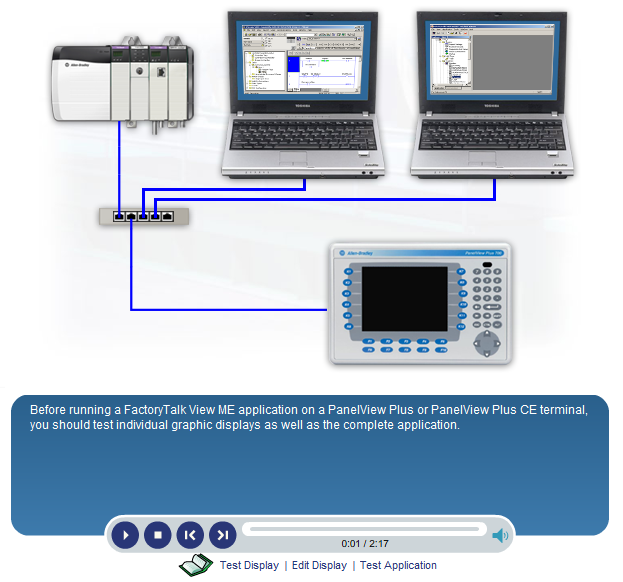
Video 9: Test a Graphic Display and the Application
Video 10: Create a Runtime File
Video 11: Download the Runtime Application to the PanelView Plus Terminal
I hope you’ve found this listing of Rockwell’s FactoryTalk View Studio Machine Edition (ViewME) and PanelView Plus (PVPlus) Quick Start Videos helpful. If you have, or would like to offer your own opinion on the usefulness of these Rockwell videos please click on the “post a comment or question” link below to comment on this article.
Until next time, Peace ✌️
If you enjoyed this content, please give it a Like, and consider Sharing a link to it as that is the best way for us to grow our audience, which in turn allows us to produce more content 🙂
Shawn M Tierney
Technology Enthusiast & Content Creator
Support our work and gain access to hundreds members only articles and videos by becoming a member at The Automation Blog or on YouTube. You’ll also find all of my affordable PLC, HMI, and SCADA courses at TheAutomationSchool.com.

- FactoryTalk Design Workbench First Look, CCW Comparison - December 19, 2025
- Drew Allen of Grace Technologies on Automation, Safety, and More (P256) - December 17, 2025
- Robotics in Warehouse Automation with Erik Nieves of Plus One Robotics (P255) - December 10, 2025

Discover more from The Automation Blog
Subscribe to get the latest posts sent to your email.
Hello Shawn,
Thans.I was looking for similar basic videos for Factory Talk Site Edition.
Good morning Priya,
If I run across any I’ll update the post – I only have ViewME at the moment so haven’t made any SE vids yet myself,
Sincerely,
Shawn Tierney
Do you have videos on Site edition?
Good morning Priya,
I just looked and don’t see any available – anything in particular you were looking for?
Sincerely,
Shawn Tierney
[sc name="stsigcom"]
Excellent!!
Thank you for this list of quick start videos. It’s been a while since I used RSView32 and this list was very helpful..
You’re very welcome Rich,
Shawn Tierney
[…] NOTE: The newest version of this article is located HERE […]
[…] FactoryTalk View Studio Machine Edition (ViewME) and PanelView Plus (PVPlus) Quick Start Videos from… […]
Shawn,
Where abouts can we find more of these videos on the Rockwell website?
Your blog has been a major help with a couple of issues I have had and given me guidance in a few projects I have carried out.
Many thanks.
Andy
Good morning Andy,
I’ve linked to all the Rockwell videos I’ve found here:
http://www.theautomationblog.com/rockwell-video-blog-index/
Thank you very much for your comments,
Shawn Tierney
[sc name="stsigcom"]